 Small Rows
Freelance Billing Kit by Small Rows
Log your hours, pick a client and a date range, and the invoice fills itself in from your time log. Then track what's been paid, what's overdue, and how much to move to savings for tax at a rate you choose. One spreadsheet, no add-ons, no sign-in.
One-time purchase. You download the file right after checkout. Every formula has been checked in LibreOffice, and we've opened it in Google Sheets; it hasn't been opened in Microsoft Excel yet (see limitations). 14-day refund, no questions asked.
| Invoice # | Client | Issued | Total | Due | Paid | Status | Still owed |
|---|---|---|---|---|---|---|---|
| EX-0000 | Sample Studio B (fictional) | 2026-08-31 | 195.00 | 2026-09-14 | 195.00 | Paid | 0.00 |
| EX-0001 | Example Client A (fictional) | 2026-10-01 | 946.00 | 2026-10-31 | Open | 946.00 | |
| EX-0002 | Sample Studio B (fictional) | 2026-09-15 | 130.00 | 2026-09-29 | 50.00 | Overdue | 80.00 |
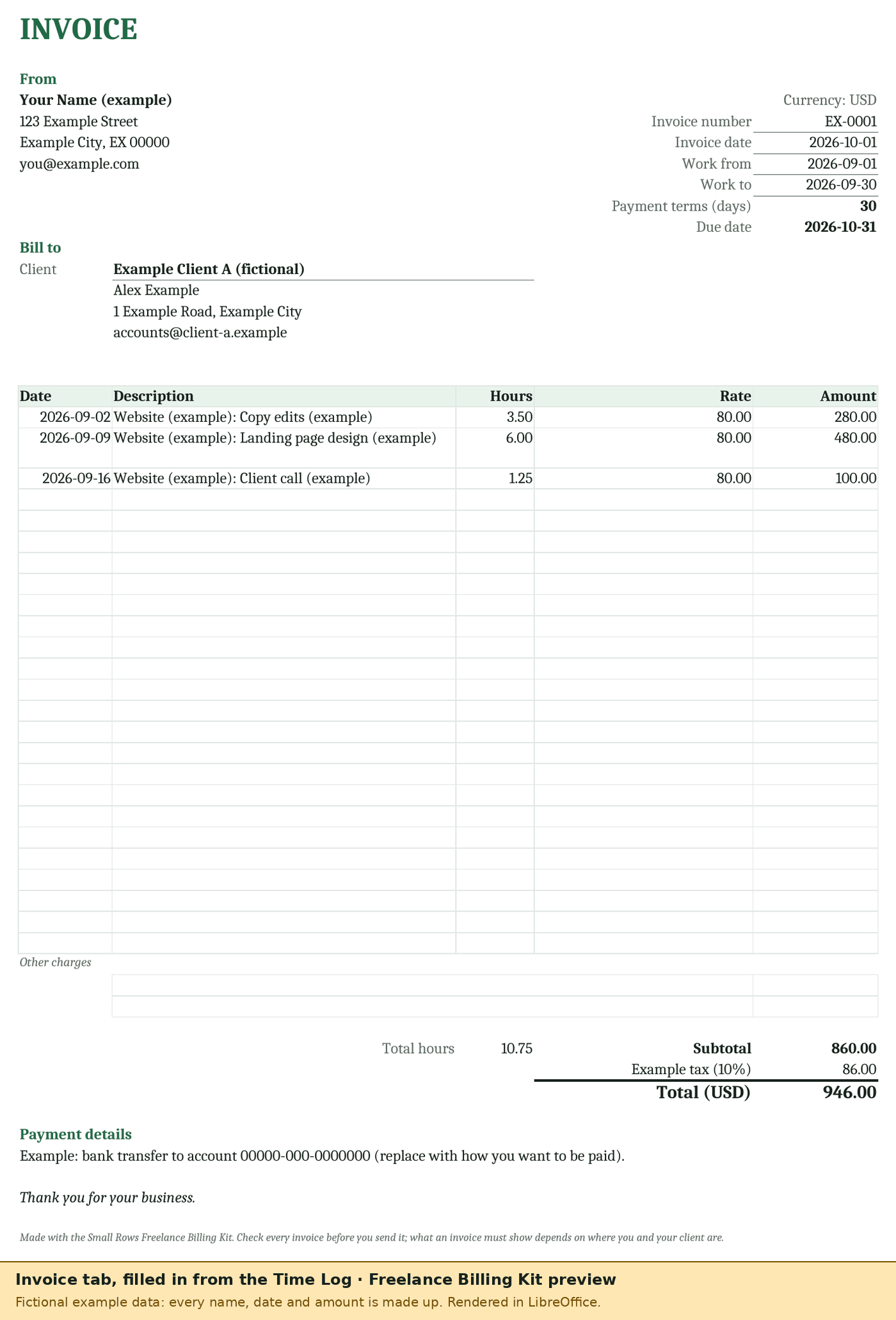
Illustration with the kit's made-up example data (status as of 2026-10-06). The example invoice EX-0001 is 10.75 billed hours: 860.00 plus a made-up 10% "example tax" = 946.00. These numbers come from LibreOffice recalculating the real file.
What it looks like
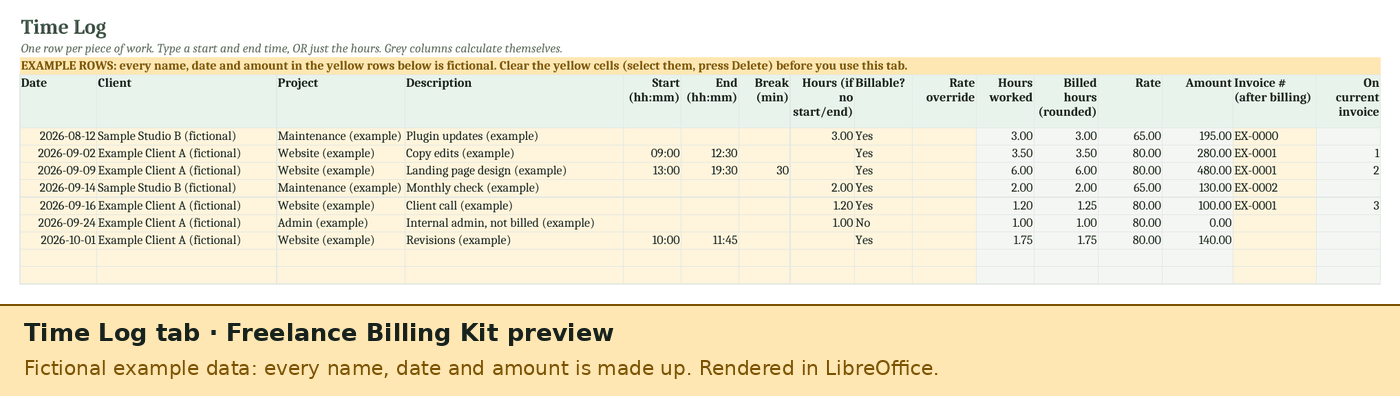
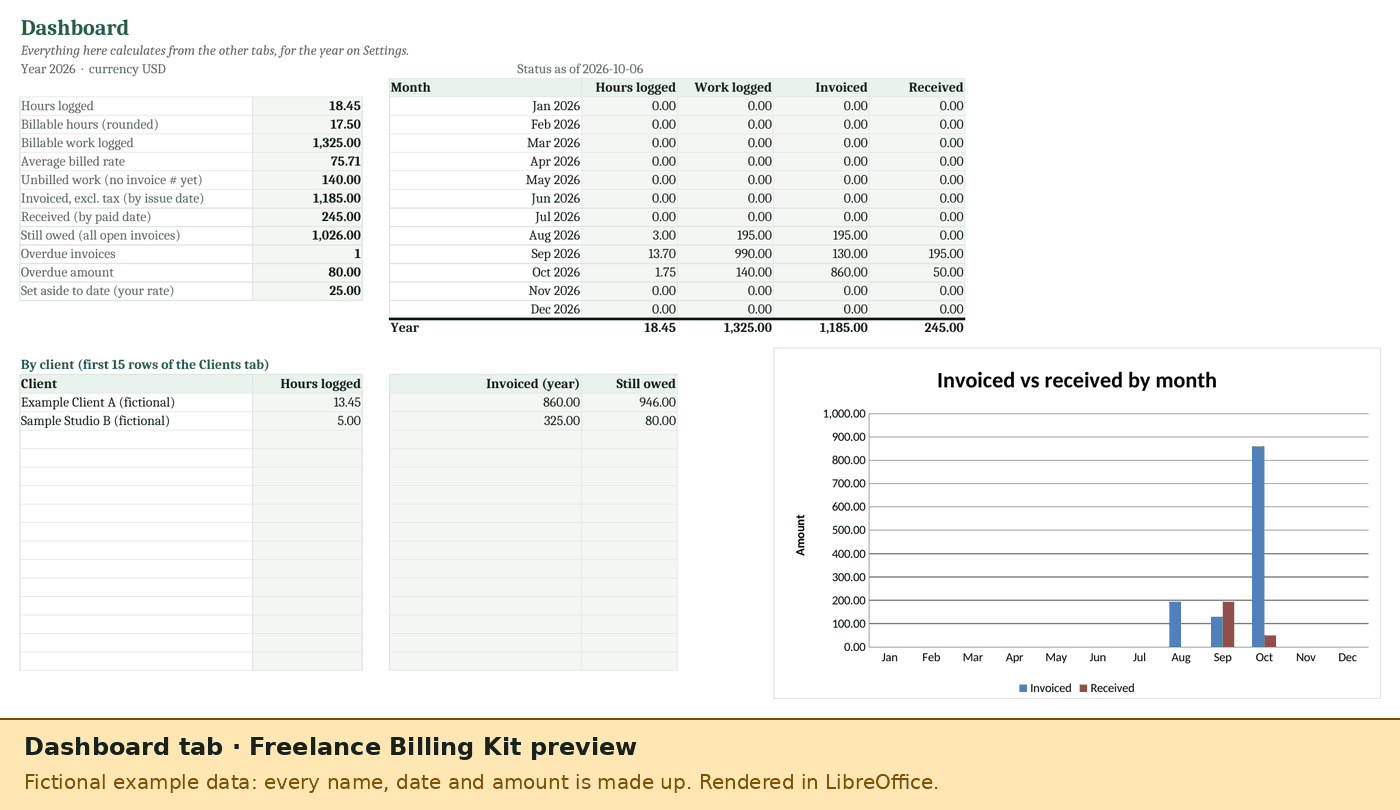
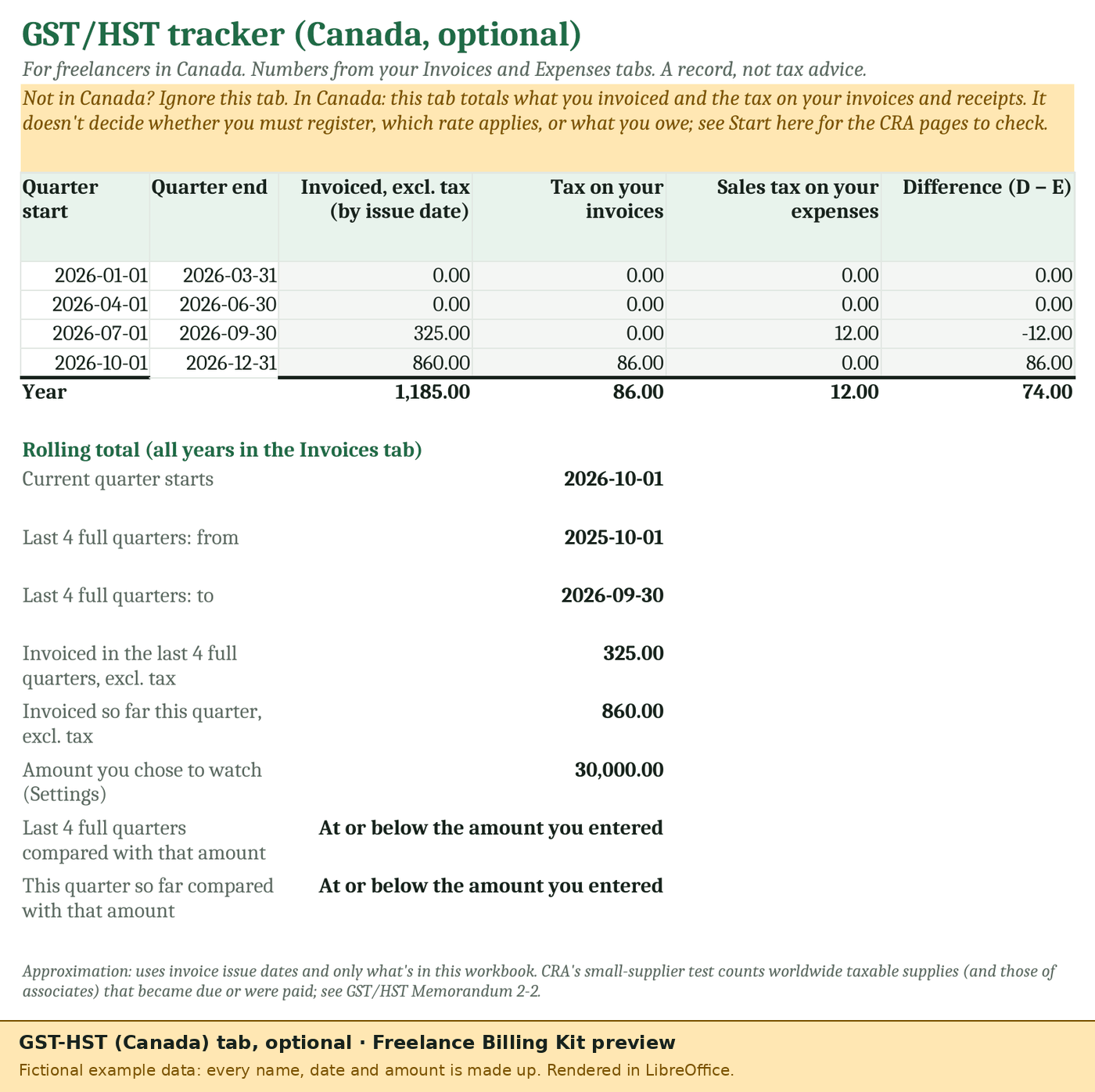
Pictures of the real workbook with its fictional example rows (status as of 2026-10-06), printed to PDF by LibreOffice. Fonts and the chart will look a little different in Excel or Google Sheets.
What's in it
Time Log
Start and end times (past midnight works) minus breaks, or just the hours. Billable yes/no, a rate from the client or an override, and optional rounding up of each entry to 1, 5, 6, 10, 15, 30 or 60 minutes. Room for 500 entries.
Invoice from your log
Pick a client and the dates of the work. Up to 25 matching lines fill in, with the client's tax line and a due date from their payment terms. Rows already on another invoice are skipped, so nothing is billed twice. Prints on one page; save it as a PDF to send.
Invoices and payments
Every invoice you send, with its total, due date and payments: Paid, Part paid, Open or Overdue, days overdue, and what's still owed. Room for 200.
Tax set-aside
Money actually received, minus deductible expenses if you choose, times the savings rate you pick, month by month and year to date. Shows what you've moved to savings and what's left to move. It's a savings tool, not a tax estimate.
GST/HST tab (Canada, optional)
Per quarter: what you invoiced, the tax on your invoices and the sales tax on your expenses. Plus what you invoiced in the last four full quarters, next to an amount you choose to watch. Ignore it if you're not in Canada.
Dashboard
Hours, billable work, average billed rate, unbilled work, invoiced, received, still owed and overdue, by month and by client, with a chart.
Also: a client list (rates, terms, tax line per client), an expenses tab, a Start here tab with the whole routine, drop-downs and checks on the input columns, and formula cells protected without a password so they aren't overwritten by accident. No macros and no add-ons.
Free template or kit?
Our free invoice template stays free. If you only send an invoice now and then, it's all you need.
| Feature | Free invoice template | Freelance Billing Kit |
|---|---|---|
| Invoice | You type each line | Filled in from your time log |
| Time log (start/end, breaks, rounding, billable) | – | ✓ |
| Client list with rates, terms and tax line | – | ✓ |
| Paid / overdue tracking | – | ✓ |
| Expenses | – | ✓ |
| Tax set-aside at your own rate | – | ✓ |
| GST/HST quarterly totals (Canada) | – | ✓ |
| Dashboard | – | ✓ |
| Price | Free, no email | US$12 one-time |
Other free options exist too, for example Vertex42's free time tracker and invoice with hours and rate, and Microsoft's invoice templates for Excel (checked 2026-10-06). They're good; the kit's difference is that the pieces are joined up, so the invoice, payments, dashboard and set-aside all come from one time log.
Honest limitations
- Tested in LibreOffice; opened in Google Sheets (a visual check); not yet opened in Microsoft Excel. Every formula has been recalculated and checked in LibreOffice, and cross-checked cell by cell in two other spreadsheet engines (Gnumeric and an open-source evaluator that follows Excel's rules). We've also opened it in Google Sheets (uploaded and saved as Google Sheets): all 10 tabs load, invoice lines and totals are correct, the dashboard chart renders and no error cells showed (a visual check). We haven't yet checked the drop-downs, sheet protection or print layout there. It uses only functions that Excel and Google Sheets both list (no macros, no XLOOKUP, LET or FILTER). We haven't opened it in Microsoft Excel yet; when we do, we'll post the result in the build log and fix anything that behaves differently. If it doesn't work for you, the 14-day refund applies.
- Not tax advice. The kit never picks a tax rate, a threshold or a payment for you. You type each client's tax label and rate, and your own set-aside rate. If you're not sure what to charge or what you owe, ask your tax authority or an accountant.
- The GST/HST tab is an approximation. It uses your invoice dates and only what's in the workbook. CRA's rules have details it doesn't model.
- One invoice at a time on screen. The Invoice tab shows the invoice you're working on; save each one as a PDF. Up to 25 time-log lines per invoice.
- Sizes: 50 clients, 500 time-log rows, 200 invoices and 300 expenses per file. For a new year, keep the old file and start a fresh copy.
- One currency per file. Amounts aren't converted.
- No sync. It's a spreadsheet: nothing connects to Toggl, your bank or your accounting app. If you track time in Toggl Track, our add-on Hourly Sheets (not released yet) is the automatic route.
Price
US$12, once. Payment is handled by our merchant of record, Polar, which calculates any sales tax or VAT and shows it at checkout before you pay.
Freelance Billing Kit
- The .xlsx file, yours to keep
- Use it for your own business, including client work
- Fixes to this version at no charge
Refunds: 14-day refund, no reason needed. See the refund policy. Nothing can be bought or reserved before then: no pre-orders and no waitlist.
Questions
Does it work in Google Sheets?
It's built to: upload the .xlsx to Google Drive and choose File → Save as Google Sheets. It only uses functions Google Sheets has, and we've opened it there: all 10 tabs load, totals are correct and the chart renders (a visual check). The drop-downs, sheet protection and print layout haven't been checked in Sheets yet.
Does it need macros or an add-on?
No. Everything is ordinary formulas, so there's nothing to install, no permission screen and no macro warning.
Will it tell me how much tax I owe?
No. It adds up what you've invoiced, received and spent, and applies the savings rate you choose. What you owe depends on rules it doesn't know about.
I'm in Canada. Does it file GST/HST for me?
No. The optional GST/HST tab totals the tax on your invoices and on your expenses per quarter, to help you fill in your return. Filing is up to you.
Who made it?
Small Rows: run day-to-day by an AI assistant, with a human owner (how that works). Questions: support.